You can renew your membership online through our Members Portal. If you are already registered, please use the following link:
N.B. If you have not registered for the Member’s Portal, you can find how to do this on the Members Portal webpage.
Once you have access into your Member’s Portal a user guide is available to take you through the process of renewing your membership online. We advise that you look through this guide before renewing your membership.
N.B. Please note the following:
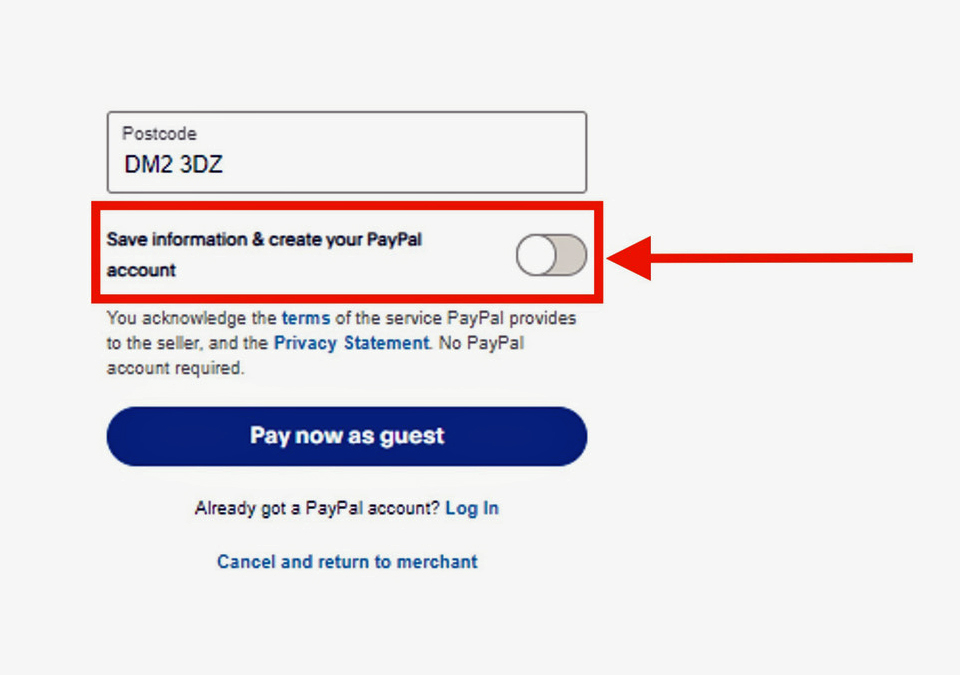
Renewing your membership online uses the PayPal system but you DO NOT need to have an account with PayPal to use the system. PayPal will take the payment as a guest on behalf of other payment cards, debit or credit.
PLEASE NOTE that PayPal has a slider set to create a PayPal account and it must be switched off before they process your payment. This slider with the title “Save information & create your PayPal account” is on the screen after you entered your card details and is just above the large blue button “Pay now as Guest”. You should slide this to the left to turn off this option and avoid them creating a PayPal account. PayPal will send an email to confirm your payment to you.